4. Scripting
The automatization suite of Mechanical also supports the scripting of the ACCS extension. The examples below show how the ACCS extension and module can be loaded into the scripting environment. Once loaded, the ACCS module can be used to activate the curing simulation, control the properties, add a support remover, add results plots etc.
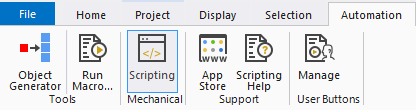
Fig. 4.1 Mechanical’s Automation tab.
An alternative is to use the recording to generate the script automatically.

Fig. 4.2 Recording button translates the GUI actions into a script.
4.1. Documentation
This section presents the embedded help of the scripting module.
4.1.1. Project class
- class ACCS_scripting.Project[source]
Project class
Class to use to script ACCS from Workbench
Note
It is important to create the instance after loading the project
- CheckMaterial()[source]
Checks all materials in the project to see if they have not been imported from an earlier release.
4.1.2. Mechanical class
- class ACCS_scripting.Mechanical(API)[source]
Mechanical class
Class to use to script ACCS from Mechanical
- AddACCS(analysis)[source]
Adds the ACCS module to the input analysis.
- Parameters:
analysis (Ansys.ACT.Automation.Mechanical.Analysis) – The analysis to which it should be added
- AddRTMFlowRateInlet(analysis)[source]
Adds the ACCS RTM Flow Rate Inlet Load to the input analysis.
- Parameters:
analysis (Ansys.ACT.Automation.Mechanical.Analysis) – The analysis to which it should be added
- AddRTMOutlet(analysis)[source]
Adds the ACCS RTM Pressure Inlet Load to the input analysis.
- Parameters:
analysis (Ansys.ACT.Automation.Mechanical.Analysis) – The analysis to which it should be added
- AddRTMPressureInlet(analysis)[source]
Adds the ACCS RTM Pressure Inlet Load to the input analysis.
- Parameters:
analysis (Ansys.ACT.Automation.Mechanical.Analysis) – The analysis to which it should be added
- AddRTMResultBC(analysis)[source]
Adds the RTM BC result to the input analysis.
- Parameters:
analysis (Ansys.ACT.Automation.Mechanical.Analysis) – The analysis to which it should be added
- AddRTMResultDegreeOfCure(analysis)[source]
Adds the RTM Degree Of Cure result to the input analysis.
- Parameters:
analysis (Ansys.ACT.Automation.Mechanical.Analysis) – The analysis to which it should be added
- AddRTMResultEntrapment(analysis)[source]
Adds the RTM Entrapment result to the input analysis.
- Parameters:
analysis (Ansys.ACT.Automation.Mechanical.Analysis) – The analysis to which it should be added
- AddRTMResultFill(analysis)[source]
Adds the RTM Fill result to the input analysis.
- Parameters:
analysis (Ansys.ACT.Automation.Mechanical.Analysis) – The analysis to which it should be added
- AddRTMResultFlowRate(analysis)[source]
Adds the RTM Flow Rate result to the input analysis.
- Parameters:
analysis (Ansys.ACT.Automation.Mechanical.Analysis) – The analysis to which it should be added
- AddRTMResultGateOpenTime(analysis)[source]
Adds the RTM Gate Open Time result to the input analysis.
- Parameters:
analysis (Ansys.ACT.Automation.Mechanical.Analysis) – The analysis to which it should be added
- AddRTMResultImport(analysis)[source]
Adds the ACCS RTM Result Import Load to the input analysis.
- Parameters:
analysis (Ansys.ACT.Automation.Mechanical.Analysis) – The analysis to which it should be added
- AddRTMResultInfusionTime(analysis)[source]
Adds the RTM Infusion Time result to the input analysis.
- Parameters:
analysis (Ansys.ACT.Automation.Mechanical.Analysis) – The analysis to which it should be added
- AddRTMResultPressure(analysis)[source]
Adds the RTM Pressure result to the input analysis.
- Parameters:
analysis (Ansys.ACT.Automation.Mechanical.Analysis) – The analysis to which it should be added
- AddRTMResultTempBC(analysis)[source]
Adds the RTM Temp BC result to the input analysis.
- Parameters:
analysis (Ansys.ACT.Automation.Mechanical.Analysis) – The analysis to which it should be added
- AddRTMResultTemperature(analysis)[source]
Adds the RTM Temperature result to the input analysis.
- Parameters:
analysis (Ansys.ACT.Automation.Mechanical.Analysis) – The analysis to which it should be added
- AddRTMResultVelocity(analysis)[source]
Adds the RTM Velocity result to the input analysis.
- Parameters:
analysis (Ansys.ACT.Automation.Mechanical.Analysis) – The analysis to which it should be added
- AddRTMResultViscosity(analysis)[source]
Adds the RTM Viscosity result to the input analysis.
- Parameters:
analysis (Ansys.ACT.Automation.Mechanical.Analysis) – The analysis to which it should be added
- AddRTMThermalImport(analysis)[source]
Adds the ACCS RTM Thermal Import Load to the input analysis.
- Parameters:
analysis (Ansys.ACT.Automation.Mechanical.Analysis) – The analysis to which it should be added
- AddResultAlpha(analysis)[source]
Adds the ACCS Degree of Cure/Crystallisation result to the input analysis.
- Parameters:
analysis (Ansys.ACT.Automation.Mechanical.Analysis) – The analysis to which it should be added
- AddResultEpsElXX(analysis)[source]
Adds the elastic strain XX result to the input analysis.
- Parameters:
analysis (Ansys.ACT.Automation.Mechanical.Analysis) – The analysis to which it should be added
- AddResultEpsElXY(analysis)[source]
Adds the elastic strain XY result to the input analysis.
- Parameters:
analysis (Ansys.ACT.Automation.Mechanical.Analysis) – The analysis to which it should be added
- AddResultEpsElXZ(analysis)[source]
Adds the elastic strain XZ result to the input analysis.
- Parameters:
analysis (Ansys.ACT.Automation.Mechanical.Analysis) – The analysis to which it should be added
- AddResultEpsElYY(analysis)[source]
Adds the elastic strain YY result to the input analysis.
- Parameters:
analysis (Ansys.ACT.Automation.Mechanical.Analysis) – The analysis to which it should be added
- AddResultEpsElYZ(analysis)[source]
Adds the elastic strain YZ result to the input analysis.
- Parameters:
analysis (Ansys.ACT.Automation.Mechanical.Analysis) – The analysis to which it should be added
- AddResultEpsElZZ(analysis)[source]
Adds the elastic strain ZZ result to the input analysis.
- Parameters:
analysis (Ansys.ACT.Automation.Mechanical.Analysis) – The analysis to which it should be added
- AddResultEpsShXX(analysis)[source]
Adds the ACCS Cure Shrinkage XX result to the input analysis.
- Parameters:
analysis (Ansys.ACT.Automation.Mechanical.Analysis) – The analysis to which it should be added
- AddResultEpsShYY(analysis)[source]
Adds the ACCS Cure Shrinkage YY result to the input analysis.
- Parameters:
analysis (Ansys.ACT.Automation.Mechanical.Analysis) – The analysis to which it should be added
- AddResultEpsShZZ(analysis)[source]
Adds the ACCS Cure Shrinkage ZZ result to the input analysis.
- Parameters:
analysis (Ansys.ACT.Automation.Mechanical.Analysis) – The analysis to which it should be added
- AddResultHeat(analysis)[source]
Adds the ACCS Generated Heat result to the input analysis.
- Parameters:
analysis (Ansys.ACT.Automation.Mechanical.Analysis) – The analysis to which it should be added
- AddResultState(analysis)[source]
Adds the ACCS Material State result to the input analysis.
- Parameters:
analysis (Ansys.ACT.Automation.Mechanical.Analysis) – The analysis to which it should be added
- AddResultTg(analysis)[source]
Adds the ACCS Glass transition temperature/reference result to the input analysis.
- Parameters:
analysis (Ansys.ACT.Automation.Mechanical.Analysis) – The analysis to which it should be added
- AddSupportRemover(analysis)[source]
Adds the ACCS module to the input analysis.
- Parameters:
analysis (Ansys.ACT.Automation.Mechanical.Analysis) – The analysis to which it should be added
- AddSurfaceExporter(analysis)[source]
Adds the ACCS Surface Exporter module to the input analysis.
- Parameters:
analysis (Ansys.ACT.Automation.Mechanical.Analysis) – The analysis to which it should be added
- CopyAnalysisSettings(AnalysisFrom, AnalysisTo)[source]
Copies analysis settings between two simulations.
- Parameters:
AnalysisFrom (Ansys.ACT.Automation.Mechanical.Analysis) – The source analysis
AnalysisTo (Ansys.ACT.Automation.Mechanical.Analysis) – The destination analysis
- changeRTMSolverSetting(analysis, property_name=None, property_value=None, result_only=False)[source]
Copies analysis settings between two simulations.
- Parameters:
analysis (Ansys.ACT.Automation.Mechanical.Analysis) – The source analysis
property_name (String) – Name of the solver property that is to be changed.
property_value (String) – The new value of the selected solver property.
result_only (Boolean) – Defines if the solver is result only.
4.1.3. ACCSload class
- class ACCS_scripting.ACCSload(load)[source]
ACCS load class
Class to use to script the ACCS load from Mechanical
- setAnalysisType(t)[source]
Sets the ACCS Analysis Type.
- Parameters:
t (str) – The analysis type either ‘Full’ or ‘Fast’
- setMRCC(steps)[source]
Sets the ACCS Cure cycle for the mechanical FAST approach.
- Parameters:
MRCC (list[step]) – The cure cycle shall be defined with a list of steps. A step can be defined as a Heating/Cooling step with [‘Heating Rate’, X, Y] defines a Heating/Cooling step at a rate of X C/min until reaching Y C or [‘Fixed temperature’, Z]: defines a Fixed temperature step with a duration of Z minutes.
4.1.4. ACCSsuprem class
- class ACCS_scripting.ACCSsuprem(load)[source]
ACCS support remover class
Class to use to script the ACCS support remover from Mechanical
- setStep(step)[source]
Defines when will the support remover will be active.
- Parameters:
step (scalar) – The step number
4.1.5. ACCSsurexp class
- class ACCS_scripting.ACCSsurexp(result)[source]
ACCS support remover class
Class to use to script the ACCS support remover from Mechanical
- setExportPath(filepath)[source]
Sets the path to the exported path.
- Parameters:
filepath (string) – The full path or relative path defining where the file will be saved
4.1.6. Interactive help
The user can also get help by running the help function on the different classes or the methods of the classes as illustrated in the following code.
1# Importing the scripting module
2import ACCS_scripting
3
4# Printing help for the Project class
5help(ACCS_scripting.Project)
6
7# Printing help for the AddACCS method of the Mechanical class
8help(ACCS_scripting.Mechanical.AddACCS)
4.2. Examples
The following examples are available at the following location:
%ProgramFiles%/LMAT/ACCS/v3.0_WB24.2/ScriptingDemo/
4.2.1. Full cure simulation
This example shows how a full cure simulation with a transient thermal and structural analysis can be defined via scripting. The first script (wbjn) adds the material to the WB project and the analysis systems, the second script (Python) is for Mechanical to add, configure, run, and post-process the cure simulation within Mechanical.
Workbench journal script
**Show/Hide Code**
 1# encoding: utf-8
 2
 3Reset()
 4
 5import os
 6import re
 7
 8directory = os.path.dirname(os.path.abspath(__file__))
 9cdb = os.path.join(directory, "C-shape.cdb")
10script = os.path.join(directory, "test_scripting_full.py")
11
12
13# Importing the scripting module
14import ACCS_scripting
15
16
17# Instantiating the project interface
18ACCS_proj = ACCS_scripting.Project()
19
20
21EngD_sys = GetTemplate(TemplateName="EngData").CreateSystem()
22EngD_EngD = EngD_sys.GetContainer(ComponentName="Engineering Data")
23for m in EngD_EngD.GetMaterials():
24    m.Delete()
25EngD_fav = EngData.LoadFavoriteItems()
26EngD_lib = EngData.OpenLibrary(Name="Cure Simulation", Source="ACCS_Library.xml")
27AS4 = EngD_EngD.ImportMaterial(Name="UD epoxy prepreg", Source="ACCS_Library.xml")
28AS4.SetAsDefaultSolidForModel()
29AS4.SetAsDefaultFluidForModel()
30EngD_engd = EngD_sys.GetComponent(Name="Engineering Data")
31
32
33FEM_sys = GetTemplate(TemplateName="External Model").CreateSystem(
34    Position="Below", RelativeTo=EngD_sys
35)
36FEM_sys.GetContainer(ComponentName="Setup").AddDataFile(FilePath=cdb)
37FEM_setup = FEM_sys.GetComponent(Name="Setup")
38FEM_setup.Update(AllDependencies=True)
39
40
41MaterialReleases = ACCS_proj.CheckMaterial()
42if MaterialReleases != None:
43    print("Materials need to be updated")
44    ACCS_proj.UpgradeMaterial()
45
46
47ACCS_proj.HomogeneizeMaterial()
48
49
50Th_tpl = GetTemplate(TemplateName="Transient Thermal", Solver="ANSYS")
51Full_Th_sys = Th_tpl.CreateSystem(Position="Right", RelativeTo=FEM_sys)
52Full_Th_sys.DisplayText = "Full - Transient Thermal"
53Full_Th_engd = Full_Th_sys.GetComponent(Name="Engineering Data")
54Full_Th_model = Full_Th_sys.GetComponent(Name="Model")
55Full_Th_setup = Full_Th_sys.GetContainer(ComponentName="Setup")
56Full_Th_solution = Full_Th_sys.GetComponent(Name="Solution")
57
58Full_Th_engd.ReplaceWithShare(
59    TargetSystem=Full_Th_sys, ComponentToShare=EngD_engd, SourceSystem=EngD_sys
60)
61FEM_setup.TransferData(TargetComponent=Full_Th_model)
62
63
64Transfer_tpl = GetComponentTemplate(
65    Name="SimulationSetupCellTemplate_StructuralStaticANSYS"
66)
67St_tpl = GetTemplate(TemplateName="Static Structural", Solver="ANSYS")
68Full_St_sys = St_tpl.CreateSystem(
69    ComponentsToShare=[Full_Th_engd, Full_Th_model],
70    DataTransferFrom=[
71        Set(
72            FromComponent=Full_Th_solution,
73            TransferName=None,
74            ToComponentTemplate=Transfer_tpl,
75        )
76    ],
77    Position="Right",
78    RelativeTo=Full_Th_sys,
79)
80Full_St_sys.DisplayText = "Full - Static Structural"
81Full_St_setup = Full_Th_sys.GetContainer(ComponentName="Setup")
82
83
84Full_Th_model.Update(AllDependencies=True)
85
86
87Full_St_setup.Edit()
88Full_St_setup.SendCommand(
89    Command="WB.AppletList.Applet('DSApplet').App.Script.doToolsRunMacro(\""
90    + re.escape(script)
91    + '")'
92)
Mechanical journal script
**Show/Hide Code**
  1# encoding: utf-8
  2
  3import os
  4
  5directory = os.path.dirname(os.path.abspath(__file__))
  6RSO = os.path.join(directory, "C-shape.rso")
  7
  8
  9import ACCS_scripting
 10
 11
 12# Instantiating the mechanical interface
 13ACCS_mech = ACCS_scripting.Mechanical(ExtAPI)
 14
 15
 16LoadSteps = [15600, 20400, 20640]
 17CureCycle = [
 18    [0.0, 20.0],
 19    [3000.0, 120.0],
 20    [6600.0, 120.0],
 21    [8400.0, 180.0],
 22    [15600.0, 180.0],
 23    [20400.0, 20.0],
 24    [23000.0, 20.0],
 25]
 26
 27
 28part = Model.Geometry.Children[0]
 29body = part.Children[0]
 30geoBody = body.GetGeoBody()
 31
 32
 33# Adding Named Selection: Body
 34NS_body = Model.AddNamedSelection()
 35NS_body.Name = r"Body"
 36NS_body.ScopingMethod = GeometryDefineByType.Worksheet
 37NS_body.GenerationCriteria.Add(None)
 38NS_body.GenerationCriteria[0].Action = SelectionActionType.Add
 39NS_body.GenerationCriteria[0].EntityType = SelectionType.GeoBody
 40NS_body.GenerationCriteria[0].Criterion = SelectionCriterionType.Size
 41NS_body.GenerationCriteria[0].Operator = SelectionOperatorType.Largest
 42NS_body.Generate()
 43
 44# Adding Named Selection: Outer
 45NS_outer = Model.AddNamedSelection()
 46NS_outer.Name = r"Outer"
 47NS_outer.ScopingMethod = GeometryDefineByType.Worksheet
 48NS_outer.GenerationCriteria.Add(None)
 49NS_outer.GenerationCriteria[0].Action = SelectionActionType.Add
 50NS_outer.GenerationCriteria[0].EntityType = SelectionType.GeoFace
 51NS_outer.GenerationCriteria[0].Criterion = SelectionCriterionType.Size
 52NS_outer.GenerationCriteria[0].Operator = SelectionOperatorType.Largest
 53NS_outer.Generate()
 54
 55# Adding Named Selection: Inner
 56NS_inner = Model.AddNamedSelection()
 57NS_inner.Name = r"Inner"
 58NS_inner.ScopingMethod = GeometryDefineByType.Worksheet
 59NS_inner.GenerationCriteria.Add(None)
 60NS_inner.GenerationCriteria[0].Action = SelectionActionType.Add
 61NS_inner.GenerationCriteria[0].EntityType = SelectionType.GeoFace
 62NS_inner.GenerationCriteria[0].Criterion = SelectionCriterionType.Size
 63NS_inner.GenerationCriteria[0].Operator = SelectionOperatorType.RangeInclude
 64NS_inner.GenerationCriteria[0].LowerBound = Quantity(0.001, "m m")
 65NS_inner.GenerationCriteria[0].UpperBound = Quantity(0.0015, "m m")
 66NS_inner.Generate()
 67
 68# Adding Named Selection: Edge
 69NS_edge = Model.AddNamedSelection()
 70NS_edge.Name = r"Edge"
 71NS_edge.ScopingMethod = GeometryDefineByType.Worksheet
 72NS_edge.GenerationCriteria.Add(None)
 73NS_edge.GenerationCriteria[0].Action = SelectionActionType.Add
 74NS_edge.GenerationCriteria[0].EntityType = SelectionType.GeoEdge
 75NS_edge.GenerationCriteria[0].Criterion = SelectionCriterionType.LocationZ
 76NS_edge.GenerationCriteria[0].Operator = SelectionOperatorType.LessThan
 77NS_edge.GenerationCriteria[0].Value = Quantity(0.001, "m")
 78NS_edge.GenerationCriteria.Add(None)
 79NS_edge.GenerationCriteria[1].Action = SelectionActionType.Filter
 80NS_edge.GenerationCriteria[1].EntityType = SelectionType.GeoEdge
 81NS_edge.GenerationCriteria[1].Criterion = SelectionCriterionType.Size
 82NS_edge.GenerationCriteria[1].Operator = SelectionOperatorType.RangeInclude
 83NS_edge.GenerationCriteria[1].LowerBound = Quantity(0.05, "m")
 84NS_edge.GenerationCriteria[1].UpperBound = Quantity(0.06, "m")
 85NS_edge.Generate()
 86
 87# Adding Named Selection: DX
 88NS_DX = Model.AddNamedSelection()
 89NS_DX.Name = r"DX"
 90NS_DX.ScopingMethod = GeometryDefineByType.Worksheet
 91NS_DX.GenerationCriteria.Add(None)
 92NS_DX.GenerationCriteria[0].Action = SelectionActionType.Add
 93NS_DX.GenerationCriteria[0].EntityType = SelectionType.GeoVertex
 94NS_DX.GenerationCriteria[0].Criterion = SelectionCriterionType.LocationX
 95NS_DX.GenerationCriteria[0].Operator = SelectionOperatorType.Smallest
 96NS_DX.GenerationCriteria.Add(None)
 97NS_DX.GenerationCriteria[1].Action = SelectionActionType.Filter
 98NS_DX.GenerationCriteria[1].EntityType = SelectionType.GeoVertex
 99NS_DX.GenerationCriteria[1].Criterion = SelectionCriterionType.LocationZ
100NS_DX.GenerationCriteria[1].Operator = SelectionOperatorType.Smallest
101NS_DX.Generate()
102
103# Adding Named Selection: DY
104NS_DY = Model.AddNamedSelection()
105NS_DY.Name = r"DY"
106NS_DY.ScopingMethod = GeometryDefineByType.Worksheet
107NS_DY.GenerationCriteria.Add(None)
108NS_DY.GenerationCriteria[0].Action = SelectionActionType.Add
109NS_DY.GenerationCriteria[0].EntityType = SelectionType.GeoFace
110NS_DY.GenerationCriteria[0].Criterion = SelectionCriterionType.Size
111NS_DY.GenerationCriteria[0].Operator = SelectionOperatorType.Smallest
112NS_DY.GenerationCriteria.Add(None)
113NS_DY.GenerationCriteria[1].Action = SelectionActionType.Filter
114NS_DY.GenerationCriteria[1].EntityType = SelectionType.GeoFace
115NS_DY.GenerationCriteria[1].Criterion = SelectionCriterionType.LocationX
116NS_DY.GenerationCriteria[1].Operator = SelectionOperatorType.LessThan
117NS_DY.GenerationCriteria[1].Value = Quantity(0.005, "m")
118NS_DY.Generate()
119
120# Adding Named Selection: DZ
121NS_DZ = Model.AddNamedSelection()
122NS_DZ.Name = r"DZ"
123NS_DZ.ScopingMethod = GeometryDefineByType.Worksheet
124NS_DZ.GenerationCriteria.Add(None)
125NS_DZ.GenerationCriteria[0].Action = SelectionActionType.Add
126NS_DZ.GenerationCriteria[0].EntityType = SelectionType.GeoFace
127NS_DZ.GenerationCriteria[0].Criterion = SelectionCriterionType.LocationZ
128NS_DZ.GenerationCriteria[0].Operator = SelectionOperatorType.Smallest
129NS_DZ.Generate()
130
131
132# Adding element orientation
133EO = Model.Geometry.AddElementOrientation()
134EO.BodyLocation = NS_body
135EO.SurfaceLocation = NS_inner
136EO.EdgeLocation = NS_edge
137EO.AxisEdgeOrientation = EO.AxisEdgeOrientation.NegativeXAxis
138
139
140###############################################################
141#
142#              THERMAL ANALYSIS
143#
144###############################################################
145
146TH_analysis = Model.Analyses[0]
147TH_solution = TH_analysis.Solution
148
149
150TH_analysis.InitialConditions[0].InitialTemperatureValue = Quantity(20, "C")
151
152
153AS = TH_analysis.AnalysisSettings
154AS.NumberOfSteps = len(LoadSteps)
155for CSN in range(len(LoadSteps), 0, -1):
156    AS.SetStepEndTime(CSN, Quantity(LoadSteps[CSN - 1], "sec"))
157    AS.SetAutomaticTimeStepping(CSN, AutomaticTimeStepping.On)
158    AS.SetCarryOverTimeStep(CSN, AutomaticTimeStepping.On)
159    AS.SetInitialTimeStep(CSN, Quantity(120, "sec"))
160    AS.SetMinimumTimeStep(CSN, Quantity(60, "sec"))
161    AS.SetMaximumTimeStep(CSN, Quantity(240, "sec"))
162
163
164conv = TH_analysis.AddConvection()
165conv.Location = NS_inner
166conv.FilmCoefficient.Output.DiscreteValues = [Quantity(10, "W m^-1 m^-1 C^-1")]
167conv.AmbientTemperature.Inputs[0].DiscreteValues = [
168    Quantity(t[0], "s") for t in CureCycle
169]
170conv.AmbientTemperature.Output.DiscreteValues = [Quantity(t[1], "C") for t in CureCycle]
171
172
173TH_ACCS_ld = ACCS_mech.AddACCS(TH_analysis)
174
175
176TH_temp = TH_solution.AddTemperature()
177
178TH_ACCS_res_state = ACCS_mech.AddResultState(TH_analysis)
179TH_ACCS_res_alpha = ACCS_mech.AddResultAlpha(TH_analysis)
180TH_ACCS_res_Tg = ACCS_mech.AddResultTg(TH_analysis)
181TH_ACCS_res_qdot = ACCS_mech.AddResultHeat(TH_analysis)
182
183
184TH_solution.Solve(True)
185
186
187###############################################################
188#
189#              STRUCTURAL ANALYSIS
190#
191###############################################################
192
193ST_analysis = Model.Analyses[1]
194ST_solution = ST_analysis.Solution
195
196
197ACCS_mech.CopyAnalysisSettings(TH_analysis, ST_analysis)
198
199
200ST_importedload = ST_analysis.GetChildren(
201    DataModelObjectCategory.ImportedBodyTemperature, True
202)[0]
203ST_importedload.PropertyByName("PROPID_AnalysisTimeDefinition").InternalValue = 0
204
205
206ST_frictionless = ST_analysis.AddFrictionlessSupport()
207ST_frictionless.Location = NS_inner
208
209ST_DX = ST_analysis.AddDisplacement()
210ST_DX.Location = NS_DX
211ST_DX.PropertyByName("ComponentX").InternalValue = 0
212for CSN in range(0, len(LoadSteps) - 1, +1):
213    ST_DX.SetActivateAtLoadStep(CSN + 1, False)
214for CSN in range(len(LoadSteps) - 1, len(LoadSteps), +1):
215    ST_DX.SetActivateAtLoadStep(CSN + 1, True)
216ST_DX.Name = NS_DX.Name
217
218
219ST_DY = ST_analysis.AddDisplacement()
220ST_DY.Location = NS_DY
221ST_DY.PropertyByName("ComponentY").InternalValue = 0
222ST_DY.Name = NS_DY.Name
223
224ST_DZ = ST_analysis.AddDisplacement()
225ST_DZ.Location = NS_DZ
226ST_DZ.PropertyByName("ComponentZ").InternalValue = 0
227ST_DZ.Name = NS_DZ.Name
228
229
230ST_ACCS_ld = ACCS_mech.AddACCS(ST_analysis)
231ST_ACCS_ld.setAnalysisType("Full")
232ST_ACCS_ld.setViscoElasticity("Disabled")
233
234
235ST_ACCS_suprem = ACCS_mech.AddSupportRemover(ST_analysis)
236ST_ACCS_suprem.setSurfacesByNamedSelection(NS_inner)
237ST_ACCS_suprem.setStep(str(len(LoadSteps)))
238
239
240ST_ACCS_surexp = ACCS_mech.AddSurfaceExporter(ST_analysis)
241ST_ACCS_surexp.setSurfacesByNamedSelection(NS_outer)
242ST_ACCS_surexp.setExportPath(RSO)
243
244
245ST_TOTDEF = ST_solution.AddTotalDeformation()
246
247ST_EPTHXX = ST_solution.AddThermalStrain()
248ST_EPTHXX.NormalOrientation = NormalOrientationType.XAxis
249ST_EPTHXX.Name = "EPTHXX"
250
251ST_EPTHYY = ST_solution.AddThermalStrain()
252ST_EPTHYY.NormalOrientation = NormalOrientationType.YAxis
253ST_EPTHYY.Name = "EPTHYY"
254
255ST_EPTHZZ = ST_solution.AddThermalStrain()
256ST_EPTHZZ.NormalOrientation = NormalOrientationType.ZAxis
257ST_EPTHZZ.Name = "EPTHZZ"
258
259ST_ACCS_res_state = ACCS_mech.AddResultState(ST_analysis)
260ST_ACCS_res_alpha = ACCS_mech.AddResultAlpha(ST_analysis)
261ST_ACCS_res_Tg = ACCS_mech.AddResultTg(ST_analysis)
262ST_ACCS_res_qdot = ACCS_mech.AddResultHeat(ST_analysis)
263
264ST_ACCS_res_EpsShXX = ACCS_mech.AddResultEpsShXX(ST_analysis)
265ST_ACCS_res_EpsShYY = ACCS_mech.AddResultEpsShYY(ST_analysis)
266ST_ACCS_res_EpsShZZ = ACCS_mech.AddResultEpsShZZ(ST_analysis)
267
268ST_ACCS_res_EpsElXX = ACCS_mech.AddResultEpsElXX(ST_analysis)
269ST_ACCS_res_EpsElYY = ACCS_mech.AddResultEpsElYY(ST_analysis)
270ST_ACCS_res_EpsElZZ = ACCS_mech.AddResultEpsElZZ(ST_analysis)
271ST_ACCS_res_EpsElXY = ACCS_mech.AddResultEpsElXY(ST_analysis)
272ST_ACCS_res_EpsElYZ = ACCS_mech.AddResultEpsElYZ(ST_analysis)
273ST_ACCS_res_EpsElXZ = ACCS_mech.AddResultEpsElXZ(ST_analysis)
274
275
276ST_solution.Solve(wait=True)
4.2.2. Fast cure simulation via MRCC
This example shows how a fast cure simulation with a three-step structural analysis can be defined via scripting. The first script (wbjn) adds the material to the WB project and the analysis system, the second script (Python) is for Mechanical to add, configure, run, and post-process the cure simulation within Mechanical. The cure cycle is defined by the manufacturer recommended cure-cycle (heat rate, and dwell times).
Workbench journal script
**Show/Hide Code**
 1# encoding: utf-8
 2
 3Reset()
 4
 5import os
 6import re
 7
 8directory = os.path.dirname(os.path.abspath(__file__))
 9cdb = os.path.join(directory, "C-shape.cdb")
10script = os.path.join(directory, "test_scripting_fast_MRCC.py")
11
12
13import ACCS_scripting
14
15
16# Instantiating the project interface
17ACCS_proj = ACCS_scripting.Project()
18
19
20EngD_sys = GetTemplate(TemplateName="EngData").CreateSystem()
21EngD_EngD = EngD_sys.GetContainer(ComponentName="Engineering Data")
22for m in EngD_EngD.GetMaterials():
23    m.Delete()
24EngD_fav = EngData.LoadFavoriteItems()
25EngD_lib = EngData.OpenLibrary(Name="Cure Simulation", Source="ACCS_Library.xml")
26AS4 = EngD_EngD.ImportMaterial(Name="UD epoxy prepreg", Source="ACCS_Library.xml")
27AS4.SetAsDefaultSolidForModel()
28AS4.SetAsDefaultFluidForModel()
29EngD_engd = EngD_sys.GetComponent(Name="Engineering Data")
30
31
32FEM_sys = GetTemplate(TemplateName="External Model").CreateSystem(
33    Position="Below", RelativeTo=EngD_sys
34)
35FEM_sys.GetContainer(ComponentName="Setup").AddDataFile(FilePath=cdb)
36FEM_setup = FEM_sys.GetComponent(Name="Setup")
37FEM_setup.Update(AllDependencies=True)
38
39
40MaterialReleases = ACCS_proj.CheckMaterial()
41if MaterialReleases != None:
42    print("Materials need to be updated")
43    ACCS_proj.UpgradeMaterial()
44
45
46ACCS_proj.HomogeneizeMaterial()
47
48
49St_tpl = GetTemplate(TemplateName="Static Structural", Solver="ANSYS")
50Fast_MRCC_sys = St_tpl.CreateSystem(Position="Right", RelativeTo=FEM_sys)
51Fast_MRCC_sys.DisplayText = "Fast MRCC - Static Structural"
52Fast_MRCC_engd = Fast_MRCC_sys.GetComponent(Name="Engineering Data")
53Fast_MRCC_model = Fast_MRCC_sys.GetComponent(Name="Model")
54Fast_MRCC_setup = Fast_MRCC_sys.GetContainer(ComponentName="Setup")
55
56Fast_MRCC_engd.ReplaceWithShare(
57    TargetSystem=Fast_MRCC_sys, ComponentToShare=EngD_engd, SourceSystem=EngD_sys
58)
59FEM_setup.TransferData(TargetComponent=Fast_MRCC_model)
60
61
62Fast_MRCC_model.Update(AllDependencies=True)
63
64
65Fast_MRCC_setup.Edit()
66Fast_MRCC_setup.SendCommand(
67    Command="WB.AppletList.Applet('DSApplet').App.Script.doToolsRunMacro(\""
68    + re.escape(script)
69    + '")'
70)
Mechanical journal script
**Show/Hide Code**
 1# encoding: utf-8
 2
 3Reset()
 4
 5import os
 6import re
 7
 8directory = os.path.dirname(os.path.abspath(__file__))
 9cdb = os.path.join(directory, "C-shape.cdb")
10script = os.path.join(directory, "test_scripting_fast_MRCC.py")
11
12
13import ACCS_scripting
14
15
16# Instantiating the project interface
17ACCS_proj = ACCS_scripting.Project()
18
19
20EngD_sys = GetTemplate(TemplateName="EngData").CreateSystem()
21EngD_EngD = EngD_sys.GetContainer(ComponentName="Engineering Data")
22for m in EngD_EngD.GetMaterials():
23    m.Delete()
24EngD_fav = EngData.LoadFavoriteItems()
25EngD_lib = EngData.OpenLibrary(Name="Cure Simulation", Source="ACCS_Library.xml")
26AS4 = EngD_EngD.ImportMaterial(Name="UD epoxy prepreg", Source="ACCS_Library.xml")
27AS4.SetAsDefaultSolidForModel()
28AS4.SetAsDefaultFluidForModel()
29EngD_engd = EngD_sys.GetComponent(Name="Engineering Data")
30
31
32FEM_sys = GetTemplate(TemplateName="External Model").CreateSystem(
33    Position="Below", RelativeTo=EngD_sys
34)
35FEM_sys.GetContainer(ComponentName="Setup").AddDataFile(FilePath=cdb)
36FEM_setup = FEM_sys.GetComponent(Name="Setup")
37FEM_setup.Update(AllDependencies=True)
38
39
40MaterialReleases = ACCS_proj.CheckMaterial()
41if MaterialReleases != None:
42    print("Materials need to be updated")
43    ACCS_proj.UpgradeMaterial()
44
45
46ACCS_proj.HomogeneizeMaterial()
47
48
49St_tpl = GetTemplate(TemplateName="Static Structural", Solver="ANSYS")
50Fast_MRCC_sys = St_tpl.CreateSystem(Position="Right", RelativeTo=FEM_sys)
51Fast_MRCC_sys.DisplayText = "Fast MRCC - Static Structural"
52Fast_MRCC_engd = Fast_MRCC_sys.GetComponent(Name="Engineering Data")
53Fast_MRCC_model = Fast_MRCC_sys.GetComponent(Name="Model")
54Fast_MRCC_setup = Fast_MRCC_sys.GetContainer(ComponentName="Setup")
55
56Fast_MRCC_engd.ReplaceWithShare(
57    TargetSystem=Fast_MRCC_sys, ComponentToShare=EngD_engd, SourceSystem=EngD_sys
58)
59FEM_setup.TransferData(TargetComponent=Fast_MRCC_model)
60
61
62Fast_MRCC_model.Update(AllDependencies=True)
63
64
65Fast_MRCC_setup.Edit()
66Fast_MRCC_setup.SendCommand(
67    Command="WB.AppletList.Applet('DSApplet').App.Script.doToolsRunMacro(\""
68    + re.escape(script)
69    + '")'
70)
4.2.3. Fast cure simulation via T vs t
This example shows how a fast cure simulation with a three-step structural analysis can be defined via scripting. The first script (wbjn) adds the material to the WB project and the analysis system, the second script (Python) is for Mechanical to add, configure, run, and post-process the cure simulation within Mechanical. The cure cycle is defined by the temperature versus time curve.
Workbench journal script
**Show/Hide Code**
 1# encoding: utf-8
 2
 3Reset()
 4
 5import os
 6import re
 7
 8directory = os.path.dirname(os.path.abspath(__file__))
 9cdb = os.path.join(directory, "C-shape.cdb")
10script = os.path.join(directory, "test_scripting_fast_Tvst.py")
11
12
13import ACCS_scripting
14
15
16# Instantiating the project interface
17ACCS_proj = ACCS_scripting.Project()
18
19
20EngD_sys = GetTemplate(TemplateName="EngData").CreateSystem()
21EngD_EngD = EngD_sys.GetContainer(ComponentName="Engineering Data")
22for m in EngD_EngD.GetMaterials():
23    m.Delete()
24EngD_fav = EngData.LoadFavoriteItems()
25EngD_lib = EngData.OpenLibrary(Name="Cure Simulation", Source="ACCS_Library.xml")
26AS4 = EngD_EngD.ImportMaterial(Name="UD epoxy prepreg", Source="ACCS_Library.xml")
27AS4.SetAsDefaultSolidForModel()
28AS4.SetAsDefaultFluidForModel()
29EngD_engd = EngD_sys.GetComponent(Name="Engineering Data")
30
31
32FEM_sys = GetTemplate(TemplateName="External Model").CreateSystem(
33    Position="Below", RelativeTo=EngD_sys
34)
35FEM_sys.GetContainer(ComponentName="Setup").AddDataFile(FilePath=cdb)
36FEM_setup = FEM_sys.GetComponent(Name="Setup")
37FEM_setup.Update(AllDependencies=True)
38
39
40MaterialReleases = ACCS_proj.CheckMaterial()
41if MaterialReleases != None:
42    print("Materials need to be updated")
43    ACCS_proj.UpgradeMaterial()
44
45
46ACCS_proj.HomogeneizeMaterial()
47
48
49St_tpl = GetTemplate(TemplateName="Static Structural", Solver="ANSYS")
50Fast_Tvst_sys = St_tpl.CreateSystem(Position="Right", RelativeTo=FEM_sys)
51Fast_Tvst_sys.DisplayText = "Fast T vs t - Static Structural"
52Fast_Tvst_engd = Fast_Tvst_sys.GetComponent(Name="Engineering Data")
53Fast_Tvst_model = Fast_Tvst_sys.GetComponent(Name="Model")
54Fast_Tvst_setup = Fast_Tvst_sys.GetContainer(ComponentName="Setup")
55
56Fast_Tvst_engd.ReplaceWithShare(
57    TargetSystem=Fast_Tvst_sys, ComponentToShare=EngD_engd, SourceSystem=EngD_sys
58)
59FEM_setup.TransferData(TargetComponent=Fast_Tvst_model)
60
61
62Fast_Tvst_model.Update(AllDependencies=True)
63
64
65Fast_Tvst_setup.Edit()
66Fast_Tvst_setup.SendCommand(
67    Command="WB.AppletList.Applet('DSApplet').App.Script.doToolsRunMacro(\""
68    + re.escape(script)
69    + '")'
70)
Mechanical journal script
**Show/Hide Code**
 1# encoding: utf-8
 2
 3Reset()
 4
 5import os
 6import re
 7
 8directory = os.path.dirname(os.path.abspath(__file__))
 9cdb = os.path.join(directory, "C-shape.cdb")
10script = os.path.join(directory, "test_scripting_fast_Tvst.py")
11
12
13import ACCS_scripting
14
15
16# Instantiating the project interface
17ACCS_proj = ACCS_scripting.Project()
18
19
20EngD_sys = GetTemplate(TemplateName="EngData").CreateSystem()
21EngD_EngD = EngD_sys.GetContainer(ComponentName="Engineering Data")
22for m in EngD_EngD.GetMaterials():
23    m.Delete()
24EngD_fav = EngData.LoadFavoriteItems()
25EngD_lib = EngData.OpenLibrary(Name="Cure Simulation", Source="ACCS_Library.xml")
26AS4 = EngD_EngD.ImportMaterial(Name="UD epoxy prepreg", Source="ACCS_Library.xml")
27AS4.SetAsDefaultSolidForModel()
28AS4.SetAsDefaultFluidForModel()
29EngD_engd = EngD_sys.GetComponent(Name="Engineering Data")
30
31
32FEM_sys = GetTemplate(TemplateName="External Model").CreateSystem(
33    Position="Below", RelativeTo=EngD_sys
34)
35FEM_sys.GetContainer(ComponentName="Setup").AddDataFile(FilePath=cdb)
36FEM_setup = FEM_sys.GetComponent(Name="Setup")
37FEM_setup.Update(AllDependencies=True)
38
39
40MaterialReleases = ACCS_proj.CheckMaterial()
41if MaterialReleases != None:
42    print("Materials need to be updated")
43    ACCS_proj.UpgradeMaterial()
44
45
46ACCS_proj.HomogeneizeMaterial()
47
48
49St_tpl = GetTemplate(TemplateName="Static Structural", Solver="ANSYS")
50Fast_Tvst_sys = St_tpl.CreateSystem(Position="Right", RelativeTo=FEM_sys)
51Fast_Tvst_sys.DisplayText = "Fast T vs t - Static Structural"
52Fast_Tvst_engd = Fast_Tvst_sys.GetComponent(Name="Engineering Data")
53Fast_Tvst_model = Fast_Tvst_sys.GetComponent(Name="Model")
54Fast_Tvst_setup = Fast_Tvst_sys.GetContainer(ComponentName="Setup")
55
56Fast_Tvst_engd.ReplaceWithShare(
57    TargetSystem=Fast_Tvst_sys, ComponentToShare=EngD_engd, SourceSystem=EngD_sys
58)
59FEM_setup.TransferData(TargetComponent=Fast_Tvst_model)
60
61
62Fast_Tvst_model.Update(AllDependencies=True)
63
64
65Fast_Tvst_setup.Edit()
66Fast_Tvst_setup.SendCommand(
67    Command="WB.AppletList.Applet('DSApplet').App.Script.doToolsRunMacro(\""
68    + re.escape(script)
69    + '")'
70)
4.3. Running the solver
It is also possible to run directly an input file generated by Mechanical using the ACCS integration in the ANSYS solver. To do so, one should use the cbatch files stored in the following directory:
On Windows: > %ProgramFiles%\LMAT\ACCS\v3.0_WB24.2\UPFs\
Two scripts are available:
- RunACCS_FULL.bat:
Run the input file using the FULL approach
- RunACCS_FAST.bat:
Run the input file using the FAST approach
They both accept every options the ANSYS solver accepts. Please refer to the ANSYS manual for more information regarding how to run the ANSYS solver.
On Windows, a complete example for the FULL approach wih would be the following:
1"%ProgramFiles%\LMAT\ACCS\v3.0_WB24.2\UPFs\RunACCS_FULL.bat" ^
2   -p ansys -s noread -l en-us -t -d win32 -b nolist ^
3   -smp -np4 ^
4   -dir "%CD%" ^
5   -j "jobname" ^
6   -i "%CD%\inputfile.inp" ^
7   -o "%CD%\logfile.out"